Call for Quotes
Contact Oliveston Ltd who have 8 Years Experience in JLR Vehicles
We are Fully Mobile and come to you Nationwide.
We Stock all Keys and Offer Same Day or Next Day Spare Lost Keys All models to 2023+
You can Pay Cash or Card or Bank. No Prepayment is Required for Bookings.
Simple Easy to Book Via Phone or Email.
Full Warranty and Invoices Supplied
How to Replace Your Range Rover Remote Key Battery in Minutes
How to Replace Your Range Rover Remote Key Battery in Minutes
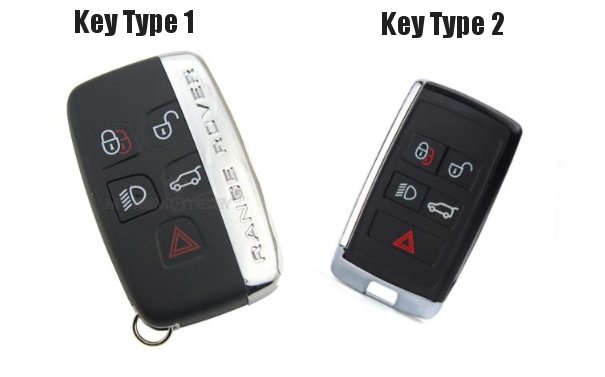
Is your Range Rover remote key fob not working as it should? One of the most common issues is a depleted battery. Luckily, replacing the battery is a quick and simple process you can handle yourself with the right guidance. In this guide, JLR Key Genie will walk you through how to replace your Range Rover remote key battery in just a few easy steps.
Signs Your Range Rover Key Fob Battery Needs Replacing
Before you get started, it’s important to confirm that the battery is the issue. Here are some common signs that your Range Rover key fob needs a fresh battery:
- The remote key is unresponsive or works intermittently.
- The range of the remote is significantly reduced.
- The dashboard displays a low key battery warning.
If you’re experiencing any of these issues, it’s time to replace the battery in your key fob.
What You’ll Need
To replace your Range Rover remote key battery, gather the following items:
- A new CR2032 battery (the most common type for Range Rover keys).
- A small flathead screwdriver or a similar tool to help open the key fob.
It’s a good idea to use a high-quality battery from a trusted brand to ensure optimal performance and longevity.
Step-by-Step Instructions for Replacing the Battery
Follow these steps to replace the battery in your Range Rover remote key:
- Locate the manual key release button: On your key fob, there is a small button or sliding latch that allows you to remove the manual key. Press or slide this button to release the key blade.
- Open the key fob: With the manual key removed, you’ll see a small seam in the key fob casing. Use your flathead screwdriver to gently pry open the casing along this seam. Be careful not to apply too much force to avoid damaging the plastic.
- Remove the old battery: Once the casing is open, you’ll see the old CR2032 battery. Carefully remove it, noting its orientation (positive side up or down).
- Insert the new battery: Place the new CR2032 battery into the compartment, ensuring it’s positioned the same way as the old one. The positive (+) side should face up in most cases.
- Reassemble the key fob: Snap the two halves of the key fob casing back together. Ensure they are securely closed to protect the internal components.
- Test your key fob: Press a few buttons on your key fob to confirm it’s working properly. If everything is functioning as expected, you’re all set!
When to Call the Experts
If you’ve replaced the battery and your key fob is still not working, there may be an underlying issue with the key fob or your vehicle’s programming. This is where JLR Key Genie can help. We specialise in diagnosing and repairing Range Rover key fobs, along with offering replacement keys, KVM programming, and other essential locksmith services for JLR vehicles.
Our mobile technicians cover the entire UK, so whether you're in need of emergency key assistance or a spare key, we’re just a call away.
Final Thoughts
Replacing your Range Rover remote key battery is a straightforward task that most owners can handle in under a minute. However, if you encounter any complications or prefer professional assistance, JLR Key Genie has you covered. From key fob repairs to module programming, we’re here to help keep your Jaguar, Land Rover, or Range Rover in top shape.
Need help with your Range Rover key fob? Contact JLR Key Genie today by visiting landrover-jaguar-key-replacement.com or call us for immediate assistance.