How to Replace JLR Key Fob Battery: CR2032 Guide for Range Rover, Jaguar & Discovery
07/22/2024
Your JLR key fob uses a CR2032 lithium coin cell battery. Most JLR keys will last 2-3 years before needing replacement. Here's how to change it yourself.
Tools Needed
- CR2032 battery (quality brand recommended - Duracell, Panasonic)
- Small flathead screwdriver or plastic pry tool
- Soft cloth to protect the key
Step-by-Step Instructions
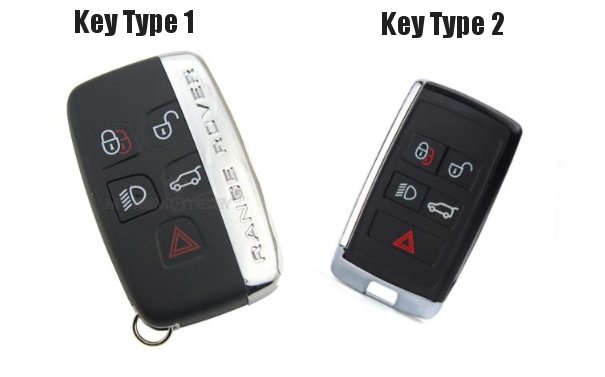
Type 1 Keys (Older Models - Pre-2016)
- Locate the small slot on the side of your key
- Insert your pry tool and gently twist to separate the halves
- Remove the old battery noting the + side orientation
- Insert new CR2032 with + side facing up
- Snap the key back together
Type 2 Keys (Modern Smart Keys)
- Press the metal button to release the emergency blade
- Use the blade tip to pry open the battery compartment
- Replace CR2032 battery (+ side facing down on most models)
- Click the cover back into place
Key Still Not Working After Battery Change?
If your key doesn't work after battery replacement, it may need re-synchronisation. This is common if:
- Battery was dead for extended period
- Multiple button presses with dead battery
- Vehicle battery was also flat
Contact Lock50 / JLR Key Genie for key programming assistance - we cover UK, USA and worldwide.
Newest products
Popular Key Types